Passing Parameter to a Predicate in .Net2.0

In this post, we will see how to pass parameter to a method representing Predicate. 

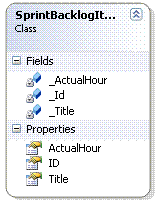
Let’s say, we have a collection of SprintBacklogItems and we want to filter all the SprintBacklogItem with Title start’s with, let say “QA” or “Dev Task” depending on a input parameter. Now from the previous post https://adilakhter.wordpress.com/2008/01/11/using-predicate-actor-of-net20/  we know that , predicate only have 1 parameter of type T.

image

Then, how to pass a input parameter _HeaderToSearch in Predicate?

1. To do that, we need to a new object called ListMatcher –

public class ListMatcher 
   { 
       private string _HeaderToSearch; 
       public ListMatcher(string headerToSearch) 
       { 
           _HeaderToSearch = headerToSearch; 
       }  

       public bool Predicate(SprintBacklogItem item) 
       { 
           return item.Title.StartsWith(_HeaderToSearch, StringComparison.InvariantCultureIgnoreCase); 
       }  

   }  

2. Next , I initialized the ListMatcher object and use the HeaderToSearch  to filter the items- 

ListMatcher matcher = new ListMatcher("QA"); 
this.FindAll(matcher.Predicate);

Done.:)

Using Predicate & Action of .Net2.0

While I started developing software, I faced this situation over and over again where I had to iterate thorough the whole collection and perform some action on each of the element of the collection or filter elements depending on some logic. It was really annoying to  write same for/foreach loop again and again.

.Net framework2.0 resolve this issue where we can just tell the collection how to filter / how to perform some action on each element of the collection and it take care of the iteration part.  Let’s check out the List<T> Class of System.Collections.Generic and what support it provides –

image 

Huge support for Searching, Sorting and Filtering!!! If we look at the declaration of let’s say – FindAll and ForEach  –

public List<T> FindAll(Predicate<T> match);public void ForEach(Action<T> action);

Here Predicate and Actor are the generic delegate which gives us the flexibility to provide a way to filter the collection or perform action to each and every element of the List. Let’s dig deeper inside them –

Inside Predicate:

Predicate is a Generic Delegate which takes support from the new generic feature of .Net Framework2.0. It is defined –

delegate bool Predicate<T>(T obj)

As per definition of MSDN, Predicate

“represents a method that defines a set of criteria and determines whether the specific object meets this criteria.”

In short, Predicate is just a generic delegate that takes T as object and check whether the object fulfill some criteria and depending on that return true|false.

Example

In this example, by using Predicate, we are going to tell the Collection how to filter and Collection will handle the whole iteration and filtering process –

Let’s say, we have a collection of SprintBacklogItem and we want to filter them depending on there State == Closed, we can do it using predicate –

1. Define a method that represents the Predicate –

private bool HasStateClosed(SprintBacklogItem item) 
        { 
            if (item.State == SprintBackLogStatesStrings.CLOSED) 
                return true; 
            return false; 
        }

This method simply checks whether the SprintBacklogItem’s state is closed or not and depending on that , return true or false. Now, if we look at the declaration of the method , we are affirmative that we can use Predicate to represent this method.

2.  Following line of code filters all the closed SprintBacklogItems –

List<SprintBacklogItem> closedItems= _SprintBackLogsItems.FindAll(HasStateClosed);

Inside Action:

Similar to Predicate,

“Action is also one kind of generic delegate which represents a method that take the object as input and perform some operation on that.”

Definition of Action delegate-

delegate void Action<T>(T obj);

From the signature of the delegate, it can represent the method with signature that must have one parameter passed to it and void as return type.

In List<T> , the method represented by the Action delegate takes an input obj and perform actions on that.

Example

In this example, by using Action, we are going to perform some predefined actions( initializing ActualHour = 10) on each elements of the List –

1. Define the method that will be represented by Action –

public void InitActualHour(SprintBacklogItem item) 
        { 
            item.ActualHour = 10; 
        }

2. Following line of code initialize all the elements’ Actual hour to 10 of the List –

this.ForEach(InitActualHour);

Isn’t it pretty cool and slick ? Instead of implementing methods for Actor and Predicate , we could have used Anonymous Delegate. I will cover that topic in my future posts. Bye for now. :)

Searching files in a Directory using .Net Framework

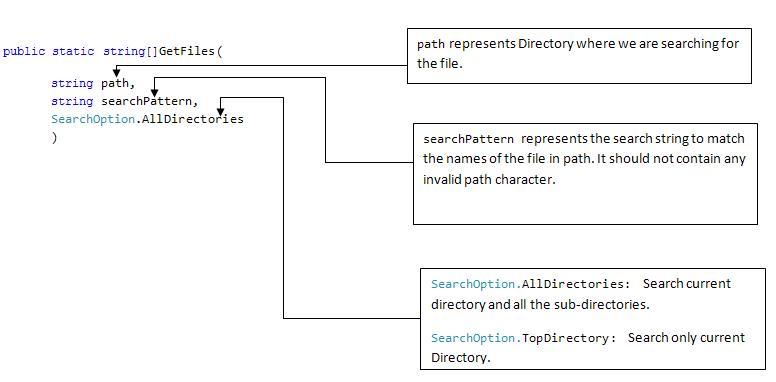
.Net framework’s Directory class of system.io namespace provides a static method GetFiles to search the files of a particular directory. Here is the static method detail

Get Files api of directory class 

Using the code snippet we can find all the files of the directory specified in path

string[] paths = Directory.GetFiles(path, stringsearchPattern, SearchOption.AllDirectories);

Here depending on the stringsearchPattern , directory mentioned in path and it sub-directories will be searched and depending on the result , one array of string containing the file paths will be returned. About searchPattern, it could contain any string. But the allowed wildcard characters are – *(zero/more character) and ?(exactly zero or more character).

For example –

1. “*.txt” returns files having .txt extension.
2. “*.?xt” returns files having extension .xt , .axt , .bxt and so on.

Be careful about one anomaly in searchPattern, if you write “*.txt” as search pattern , it gonna consider it like “*.txt*” – that is let’s consider following folders-  fileswithtxtextensions.jpg

If we search using “*.txt” – it gonna match with every one of them. We will get same kind of result for “*htm” search pattern– which will match files with extensions- *htm and *html. I don’t know the exact reason behind it and I will update about it if I get to know that.

In addition, searchPattern in GetFiles() does not support multiple filters which we may require if we want our GetFiles() functions to return ,let’s say, all the “*txt” and “.htm” files. Iteratively searching individual files could be one easy way to solve  this problem.

For more information – visit http://msdn2.microsoft.com/en-us/library/ms143316.aspx .

TestContext – more on mstest

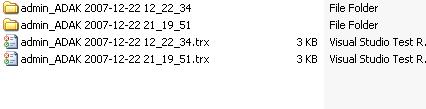
If we are in test driven development, we need to spend significant amount of time in writing unit tests. In VSTS unit testing framework, every test run create a unique folder in our machine and generate a test report ( *.trx format) for every test run-

testresult.jpg

Sometimes it’s needed to access the folder that current test run created. UnitTestAdapterContext class provides a set of properties related to current test run that can be accessed from inside unit tests.

To use the properties provided in UnitTestAdapterContext we need add the following properties in our Test Class –

private TestContext testContextInstance;

///
///Gets or sets the test context which provides
///information about and functionality for the current test run.
///
public TestContext TestContext {
 get
 {
 return testContextInstance;
 }
 set
 {
 testContextInstance = value;
 }
}

The property is automatically provided with a concrete instance of the TestContext type [1]. In essence, it implies that we do not need to instantiate or derive TestContext in our test class.

Take a look at the properties and functionalities offered by TestContext –

testconttextcd.jpg

 If I start debugging a unit test adding a break point and watch the TestContext, we can view different information about and functionality for current test run –   

unittestadaptercontext.jpg  

So, Current TestRun Directory can be accessed by just one line of code- 

 string testDirectory = TestContext.TestDir; 

Therefore , we can use class in our TestContext Unit Tests to get different informations about the current test run and we can use different functioanallity of this class – for example – BeginTimer() and EndTimer() would be verify useful to measure our application’s differenent module’s performance to validate certain non-functional requirements.

More details on TestContext is available here.

References
[1] http://msdn.microsoft.com/en-us/library/ms404699

Design a site like this with WordPress.com
Get started