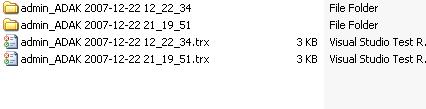
The current test run creates a unique directory for running tests and storing the generated reports (.trx) files.
In effect, additional inputs and outputs (especially, in case of data driven unit tests) can be persisted in these unique directories during test runs. In addition, unit testing process has complete access in these directories. So, it would be consistent while running the tests in any machines (e.g., in build machines or in local development environments).
Using TestContext, we can get the path of the directory related to the current test run as follows.
string testDirectory = TestContext.TestDir;
We can get the deployment directory and the directory that contains logs as follows.
To sum up, this post has described how we can get/set several important properties from TestContext. In the next post, we show how we can use it for performance measurement.
From empirical evidence, we know that improving code coverage by verifying all the boundary conditions, and ensuring quality of code-base significantly enhances maintainability and comprehensibility of complex software systems. Therefore, writing effective unit and integration tests has become one of the integral part in software development life cycle. In fact, development methodology such as TDD has been embraced rapidly due to these realized benefits.
In today’s post, we talk more about TestContext of mstest. In particular, we focus on its usage in devising effective unit tests. Before moving forward, we would like to outline the previous posts of the series regarding Unit Testing.
TestContext is an abstract class of Microsoft.VisualStudio.TestTools.UnitTesting namespace. It exposed several properties related to the current context (i.e., current test run). In addition, it provides following supports:
Get/set context-sensitive properties and instances, For instance,
During Asp.net unit tests, it stores server’s URL, and Page object.
For data driven unit tests, it provides access to the data rows.
Mechanism to measure performance of unit tests.
Following is the class definition of the TestContext class.
This file contains hidden or bidirectional Unicode text that may be interpreted or compiled differently than what appears below. To review, open the file in an editor that reveals hidden Unicode characters.
Learn more about bidirectional Unicode characters
To start using TestContext, we need to add a property in our unit test class, e.g., UserManagerTests, as illustrated below.
As we run a unit test defined in UserManagerTests, we automatically get an instance of TestContext with the relevant properties configured according to the current context. Thus, we do not require to explicitly instantiate it. Using debug mode, we can verify that the instance of TestContext is an instance of UnitTestAdapterContext, which is, in fact, derived from TestContext abstract class.
In addition, Microsoft.VisualStudio.QualityTools.Tips.UnitTest.Adapter.dll assembly contains UnitTestAdapterContext class, which is located in the directory of private assemblies installed in <vs installation directory>\common7\IDE\PrivateAssemblies.
Note that the property TestContext is actually initialized after ClassInitialize and before TestInitialize gets invoked.
In this post, we discuss how we can initialize TestContext in a test class. As a continuation of this discussion, we outline several use-cases of TestContext in the following posts.
To sum up, in this series, we introduce TestContext and has discussed how we can utilize it in different scenarios to write effective unit and integration tests. We hope that it would help to devise more effective and maintainable unit tests. Lastly, we emphasize on designing test cases thoroughly, and mapping them essentially into unit and integration tests accordingly, because only "harnessing the power that is provided by the tool and utilizing it effectively and every possible way" could bring desirable result. We highly appreciate any comments or any suggestion regarding this series. Thanks.
If we are in test driven development, we need to spend significant amount of time in writing unit tests. In VSTS unit testing framework, every test run create a unique folder in our machine and generate a test report ( *.trx format) for every test run-
Sometimes it’s needed to access the folder that current test run created. UnitTestAdapterContext class provides a set of properties related to current test run that can be accessed from inside unit tests.
To use the properties provided in UnitTestAdapterContext we need add the following properties in our Test Class –
private TestContext testContextInstance;

///
///Gets or sets the test context which provides
///information about and functionality for the current test run.
///
public TestContext TestContext {
 get
 {
 return testContextInstance;
 }
 set
 {
 testContextInstance = value;
 }
}
The property is automatically provided with a concrete instance of the TestContext type [1]. In essence, it implies that we do not need to instantiate or derive TestContext in our test class.
Take a look at the properties and functionalities offered by TestContext –
If I start debugging a unit test adding a break point and watch the TestContext, we can view different information about and functionality for current test run –
So, Current TestRun Directory can be accessed by just one line of code-
string testDirectory = TestContext.TestDir;
Therefore , we can use class in our TestContext Unit Tests to get different informations about the current test run and we can use different functioanallity of this class – for example – BeginTimer() and EndTimer() would be verify useful to measure our application’s differenent module’s performance to validate certain non-functional requirements.





 adilakhter λ
