Why is Unit Testing so important?

Why should we write unit tests? Why is it so important? To realize that we consider a team that is developing a module (say, module A), however, did not consider unit testing that seriously.

What does happen to that module?

1Module A produced lot of bugs in the development phase since it was not tested adequately. And while fixing it– A produced severe impact on other modules too, because of the fact that integration was failing again and again. Hence, the dependent modules had to change as well to stabilize final delivery.

2That’s not the end of misery. In the release testing, huge amount of bugs are identified, which resulted from the uncertain behavior of A, and fixing those become a hell of a job for developers. Just to show you one old classic diagram of software development life cycle–

image

3After relevant modules are delivered, developers could not take pride for that because of the lack of confidence regarding whether they have  delivered a quality product (from a developers perspective, we think that it is  really imperative to deliver something from which we can take pride). Please refer to the done concept of agile development to get more idea on the quality of product that we are referring. 

4 Through the course of time, A would become more susceptible to changes. And developers would become really reluctant and not comfortable to change the codes for any change request. More so, refactoring would become error-prone and troublesome due to the lack of unit and integration tests.

So, after some time, developers would start referring A as “Dead Zone” or Legacy Code, due to difficulties in its maintainability.

Now if we go back to the days when the developers were planning or starting the development process, what would you advise them ?

The situation that we have just described,  its not new to most of the developers developing for a long time. That’s why some intelligent people in agile world sat together and came up with some basic rules and practices that we must follow to make software product more maintainable. One of core principle  is to performing unit testing considering all the test criteria.

1Unit and integration testing verifies semantically correctness of software modules and how they should interact with each other. In addition, impact of changes can be easily determined, and be thoroughly tested if unit testing is done properly. In addition, it becomes easier to do code refactoring, module integration and most importantly, allows quick bug detection. To sum up, according to our experience, unit testing   improves the maintainability of software to a great extent.

2Consider unit tests as the specification of modules or software.  Any developer new to software module could just go through the unit tests to get an overview of what that module semantically entails. Thus, not only units test improves maintainability, it also enhances understanding of complex software systems.

Any comment or suggestion regarding this post is highly appreciated. Thanks!


See More

Revisions

[R-1: 02-04-2013] Porting blog-post from the following URL: http://weblogs.asp.net/adilakhter/archive/2008/04/18/why-unit-testing-is-so-important.aspx .

Visual Studio2008 Themes

If you are also fond of changing the look and feel of Visual Studio using cools themes, here is some cool links for you –

1. A list of Cool themes in Scott Hanselman’s blog
2. Dark Visual Studio
3. ZenBurn-based Visual Studio 2005 theme supporting HTML,CSS and XML
4. Join the Dark Side of Visual Studio by Dave Reed
5. TextMate Theme For Visual Studio, Take 2

del.icio.us Tags:

How to change your Visual Studio 2008 Theme –

1. Changing your colors in Visual Studio.NET – Black versus White By Scott Hanselman
2. Dark Visual Studio – By Brad Wilson
3. Pimp MY IDE by Jeff Atwood
4. Code Colorizing and readability by Jeff Atwood

Download LInks –

1. Download Jeff’s scheme
2. Download “Zenburn” scheme
3. OrenEllenbogen_DarkSchema.rar (58 KB)
4. Is You IDE HOT or Not?

How to change your themes :

Step – 1 : Click on the Import And Export Settings :

image

Step -2:  Select Import Selected Environment settings and click on Next

image


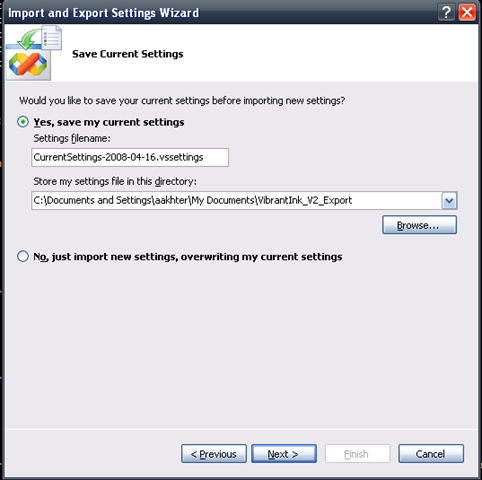
Step -3: You get the option to save your current setting. I would suggest to save it.

image

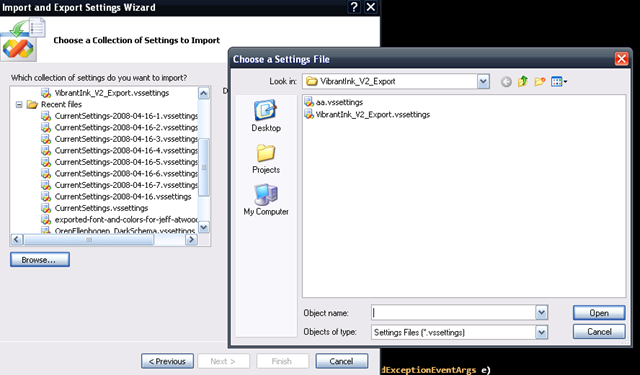
Step-4: Click Browse and select the *.vssettings file and click Next –

image

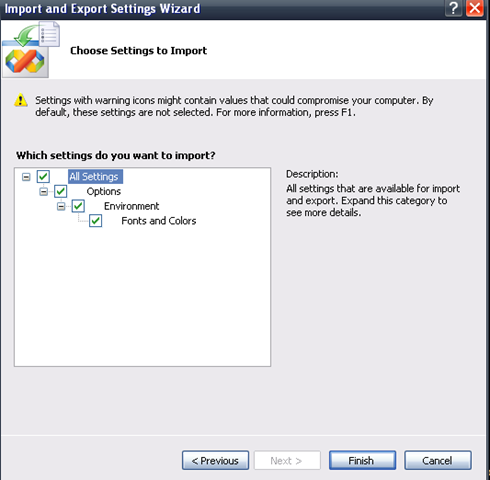
Step-5: Check the boxes the setting you want to change and click finish. You are done with you brand new theme.

image


If any error occurs or you dont feel like using your new theme, you can always get back to your old setting by getting upto Step4 and setting your themes to import is the one you saved in step – 3 –

image


And you also have the option to reset all the settings [Step-1].

Have fun with the themes.

Scott Hanselman’s 2007 Ultimate Developer and Power Users Tool List for Windows

Scott Hanselman posted a very useful list of tools that we might use in our life (Just to make it little bit easier) according to our needs. Check out the cool tools for developers and power users in Scott Hanselman’s Blog.  I am sure that you wont be surprised to see many of your favorites ones’ there in the list.

Figuring out different properties of a Image from its URL

Sometimes while working with image, it become necessary to get all the properties of an image. This time, I had to find out all the properties of an Image deployed in a web site.Its interesting- that’s why I wanted to share the small code snippet. For our today’s example – let’s pick this gif from our favorite google.com –

We will find out all the properties from the Image URL.

Something About Bitmap Class of System.Drawing –

It represents the pixel data of the graphics image as GDI+ Bitmap and expose all the attributes related to the Image Graphics. In addition to that, it enables manipulation of the Bitmap and save it as File in different format.

There are many overloaded Constructor in the Bitmap class  which enables to create image object in various way at developers convenience.

Using WebRequest and WebResponse class of we can retrieve the Stream of the Image.

string url = "http://www.google.com/intl/en_ALL/images/logo.gif";  

WebRequest request = WebRequest.Create(url); 
request.Method = "Get";  

WebResponse response = request.GetResponse(); 
Stream stream = response.GetResponseStream();

And then we can just initialize a Bitmap object with the stream that we have just retrieved from the URL.

Bitmap bitmap = new Bitmap(stream);

We are done. :) We can access all the properties exposed by the Bitmap object representing the Image Graphics –

google_log_Bitmap_QuickWatch 

Windows Live Messenger in your Web Page

We can add Windows Live Messenger in our web page now so that any one can send us IM when we are online. Its seems to me a very interesting feature for my blog . Following steps can lead to add Windows Live Messenger to your web page –
2. Create you desired Live Messenger Box or we can use Button or Status Icon as well.
3. Copy the generated HTML and paste it to our web page.

Done. Isn’t it simple. Click here to chat with me.
liveMessengerHereInMyPage

Design a site like this with WordPress.com
Get started